
How Progress Works
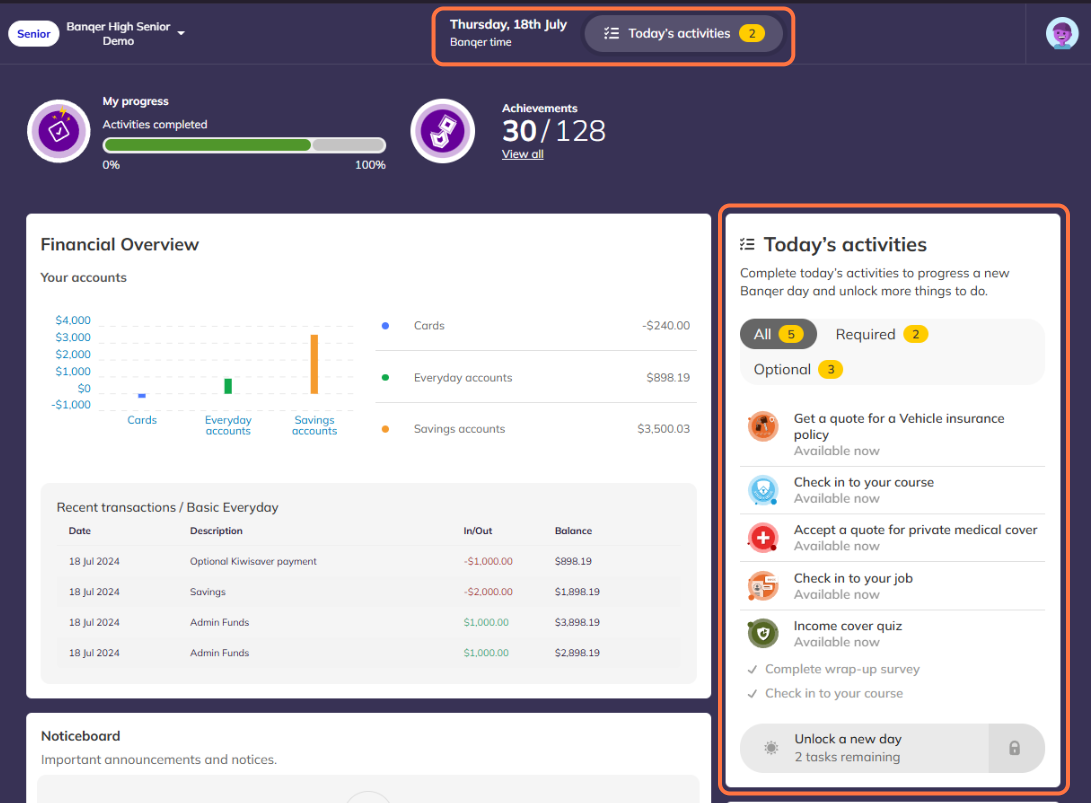
To progress through Banqer Days, students must complete the required daily activities. These are clearly visible in two locations:
Top Navigation Bar
Relevant Section on the Dashboard
Some days also include optional activities. While these do not block progress if left incomplete, they are valuable for achieving a comprehensive understanding of the content and earning platform-specific achievements.
Topics Covered in the Second 'Banqer Week' (Banqer Days 6-10)
Living Costs
Students explore the cost of living through real-world scenarios:
Kick-off Quiz: A five-question quiz assesses students' initial understanding of concepts chosen by the student, with three optional follow-up quizzes available and a final 5 question post-quiz to asses learning growth.
Housing: Students choose a rental property, balancing rental cost, travel distance, and house quality.
Banqer Marketplace: Compare and select power, Wi-Fi, and meal plans.
Optional Purchases: Choose leisure activities (e.g., gym memberships or joining a sports team), flat furnishings, and phone plans.
Wellbeing
Students learn to manage their mental and physical wellbeing:
Wellbeing Scores: Track Mental and Physical Wellbeing, which update daily.
Burn Rate: Daily wellbeing points are lost (burn rate) but can be offset by making positive decisions.
Impact of Decisions: Student experience real benefits or consequences to their decisions. For example, renting a higher-quality house improves their physical wellbeing score (to represent a better insulation and cleanliness) but it will cost more in rent than a lower-quality property.
Opportunities: Wellbeing points are earned throughout the platform, encouraging students to consider the wellbeing benefits or consequences when making decisions.
Budgeting
Students develop budgeting skills:
Kick-off Quiz: A five-question quiz assesses students' initial understanding of concepts chosen by the student, with three optional follow-up quizzes available and a final 5 question post-quiz to asses learning growth.
Weekly Budgets: Create and review budgets weekly.
Budget Reviews: Assess if they are living within their means (surplus) or exceeding them (deficit).
Adjustments: Update and refine their budgets or spending decisions as needed for the next week.
Contents Insurance
Students learn the basics of protecting their belongings:
Kick-off Quiz: A five-question quiz assesses students' initial understanding of concepts chosen by the student, with three optional follow-up quizzes available and a final 5 question post-quiz to asses learning growth.
Insurance Basics: Understand what contents insurance covers.
Request Quotes: Compare quotes with varying levels of excess and premiums.
Decision-Making: Choose an insurance policy or opt out entirely.
Random Events: Handle scenarios involving their belongings, such as making claims or updating policies.
Public Transport
Students explore public transport options:
Kick-off Quiz: A five-question quiz assesses students' initial understanding of concepts chosen by the student, with three optional follow-up quizzes available and a final 5 question post-quiz to asses learning growth.
Set Up: Obtain a bus pass and top it up with funds.
Daily Use: Choose transport options when checking into work and ensure their pass is topped up as needed.
Future Expansion: More private transport options become available in Week 3.
Higher Education
Students consider the benefits of further education:
Kick-off Quiz: A five-question quiz assesses students' initial understanding of concepts chosen by the student, with three optional follow-up quizzes available and a final 5 question post-quiz to asses learning growth.
Study Options: Explore courses ranging from short-term certificates to degrees.
Daily Check-Ins: Balance studying with their job by checking into both daily.
Financing Studies: Decide whether to use personal funds or take out a student loan.
Scope and Sequence Doc
For more details about activities and learning outcomes on a specific Banqer Day, check the Scope and Sequence document. You can access it via a link on the Teacher Dashboard. Follow the steps below to open it.